 iPhone, iPad, Apple Watch
Tallied
Your bank knows how you spend. Now you do too.
Your statements in. Your financial life understood.
Tallied reads the bank and card statements you already get and works out what they mean, on your iPhone: what changed, what's coming, what you forgot and what you kept. No bank login, no account.
7 days free, then S$6.99 a month or S$59.99 a year.
Tallied in 60 seconds
Payday is on the 25th. Where did it all go?
Shown with invented sample data. Narration is a synthetic voice.
The catch
Most money apps want your bank login.
By the first week after payday, a lot of the month's money has gone, and it's hard to say where. Your statements have the answer, but nobody wants to read forty pages of them.
Most apps fix this by asking you to link your bank, or by sending your transactions to their servers. We built Tallied to read the statements you already have, on your own phone, so your money matters stay there.
How it works
From statement to answer, on your iPhone
Save your statements
Save the PDF or CSV statements your bank already sends you, from DBS, OCBC, UOB and other Singapore banks and cards, into Tallied's folder. New ones are picked up by themselves. There's no bank login. Kept your spending in a spreadsheet? Add that too.
Tallied reads them on your iPhone
Your statements are read on the phone itself: shops named, spending sorted into categories. Cards, savings and the joint account come together, and card payments and transfers between your own accounts don't count as spending.
See where it all went
Open the app and the answer is at the top: where this month is heading, what changed, and what's due next.
Private money intelligence
Everything your statements know, worked out on your iPhone
Understand
Your statements' lines named and sorted into categories, and what changed this month and why.
Discover
The charges that repeat, the ones that went up in price, and ways to save worked out from your own numbers.
Foresee
Where the month is heading, how your budgets are filling, and which card bill is due.
Keep
Years of history from past e-statements and your own spreadsheet, and your receipts with their return-by and warranty dates.
Understand
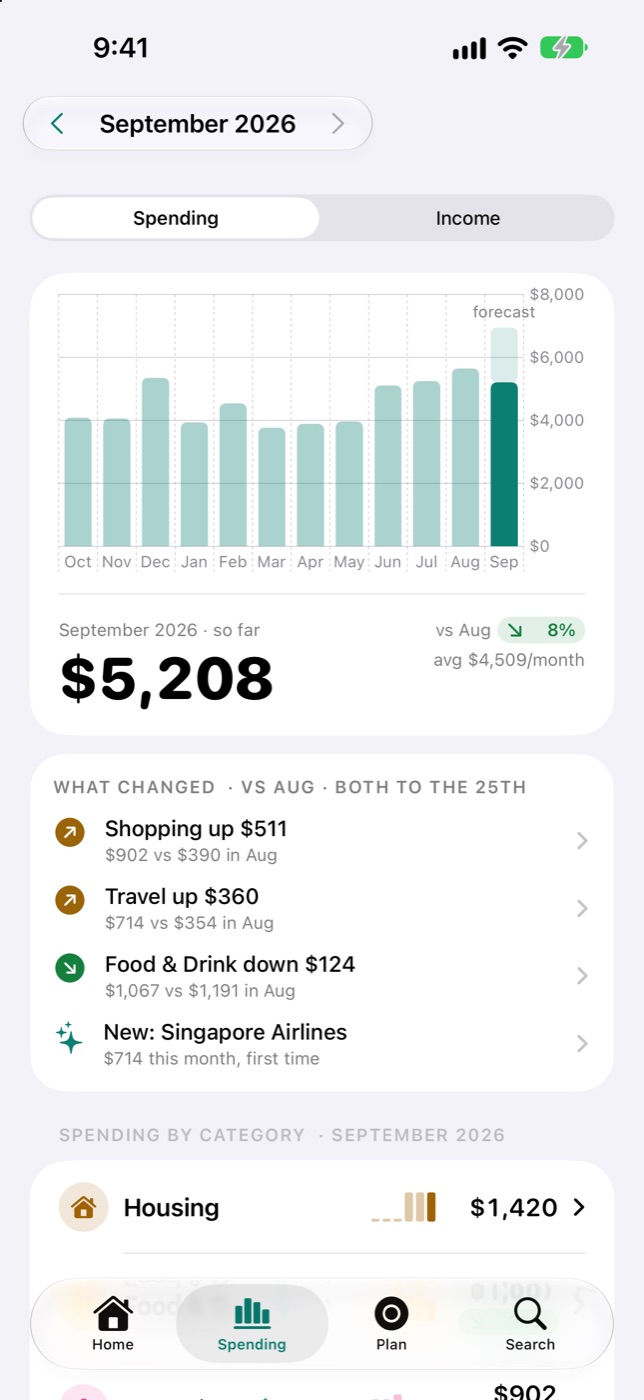
Sorted, and what changed
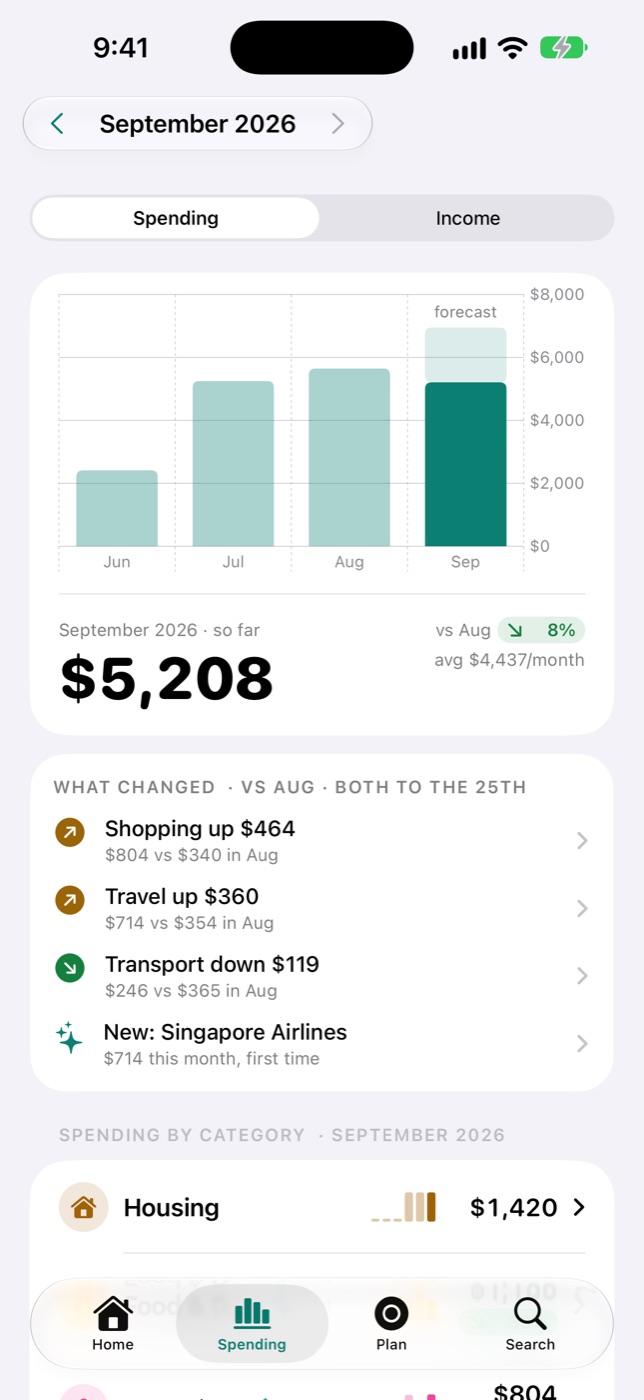
Hawker food, Grab, Shopee, the HDB loan: Tallied sorts your spending into categories. Spending puts the last few months side by side, shows the forecast for this one, and tells you what changed from last month.
Understand
Even the cryptic lines
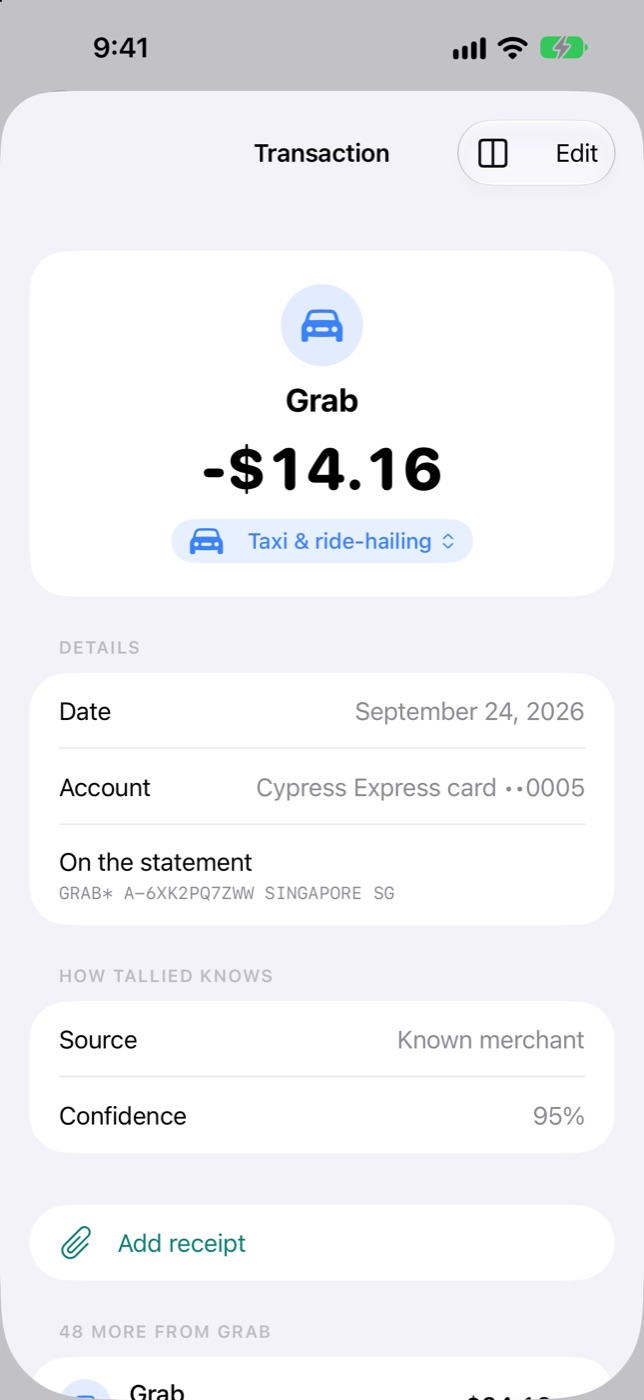
Statements are full of lines like GRAB* A-6XK2PQ7ZWW. Tallied works out who you paid and shows how sure it is. Fix a shop once and its lines follow, past and future, with Undo if you change your mind.
Discover
What repeats, and what went up
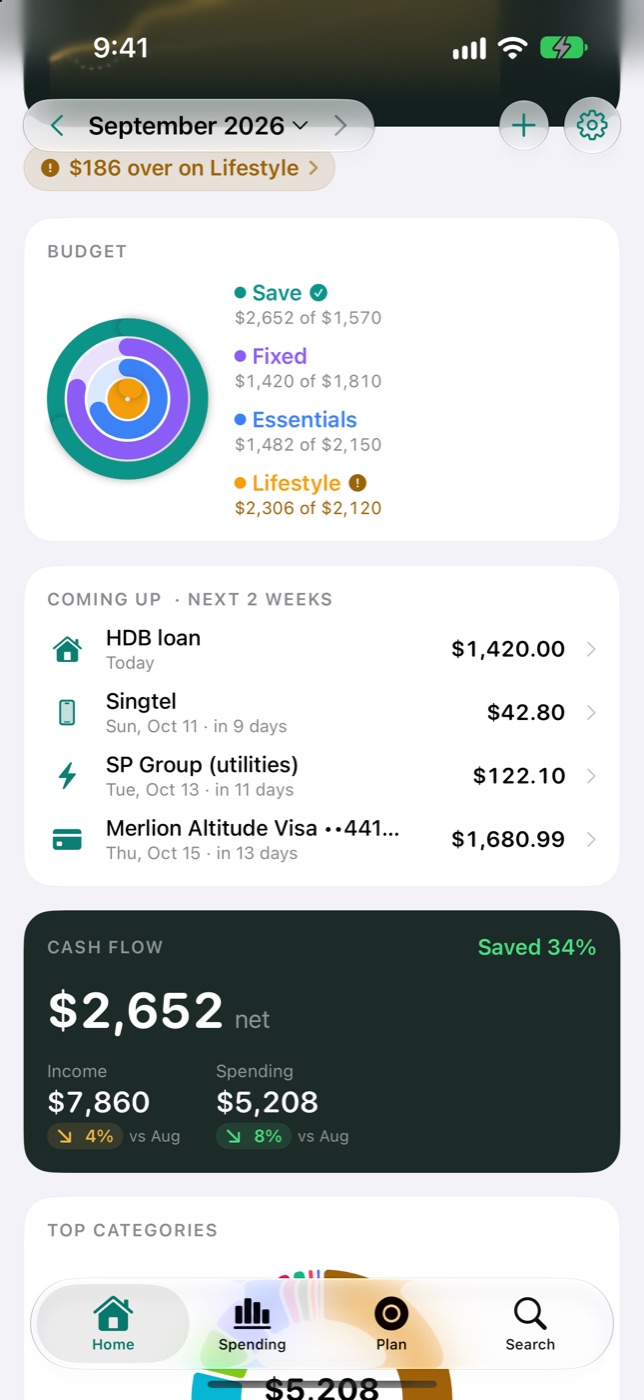
Tallied finds the charges that repeat (weekly, monthly, quarterly or yearly), shows when each is next due and whether the price went up, and can remind you before it renews. So the HDB loan or the card bill doesn't catch you out.
Discover
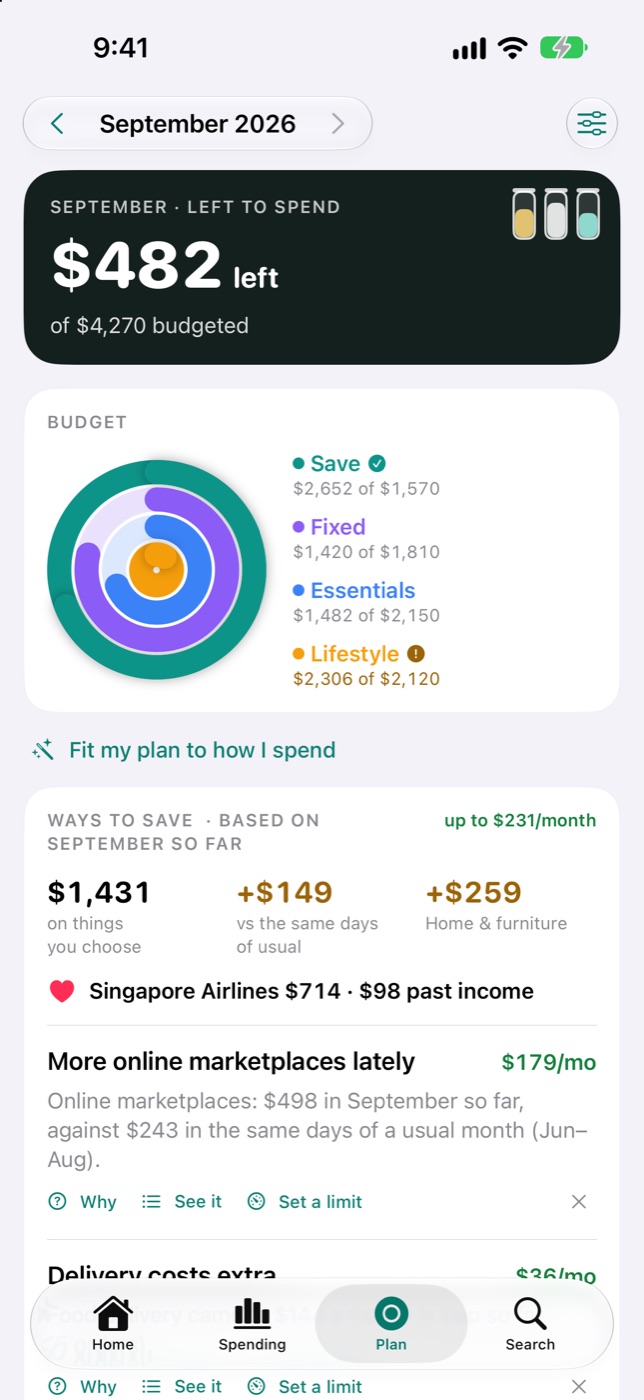
Where your money leaks
Ways to save, worked out from your own numbers: delivery fees creeping up, or small buys that add up. Tap Why to see how each one was worked out.
Discover
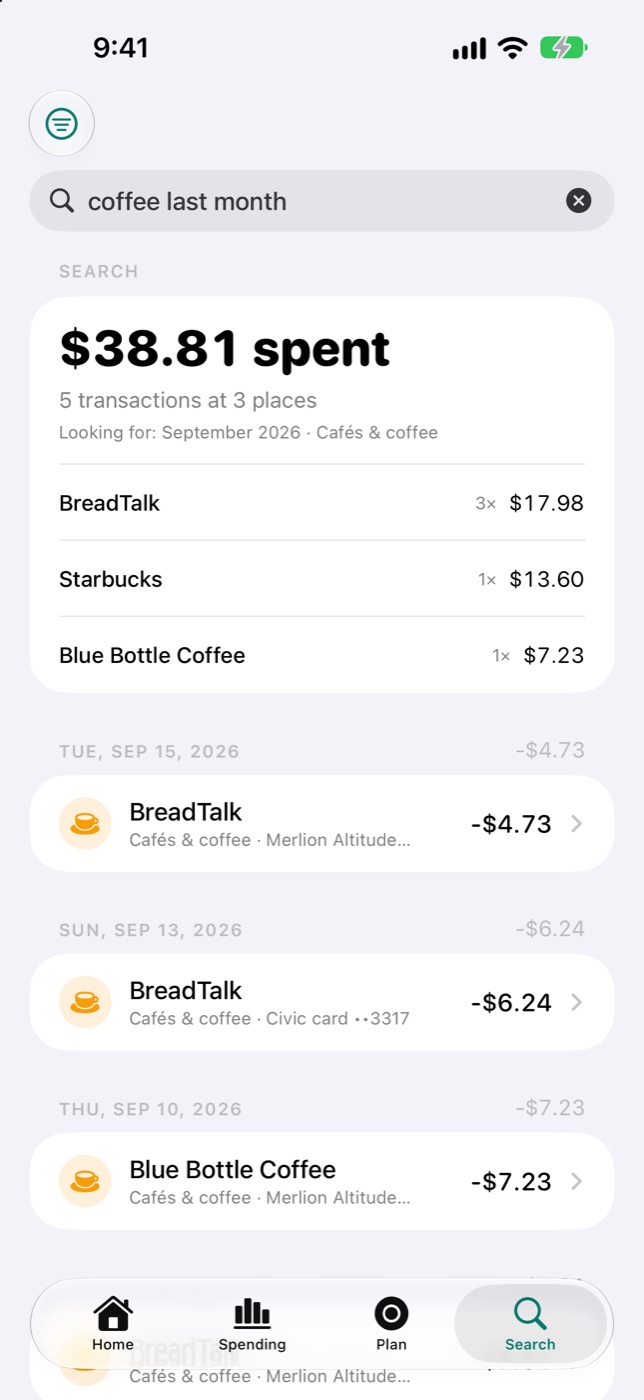
Ask in plain words
How much did I spend on coffee last month? Everything over $500 in the last three months? Type it the way you'd say it, and you get the total and the transactions behind it.
Foresee
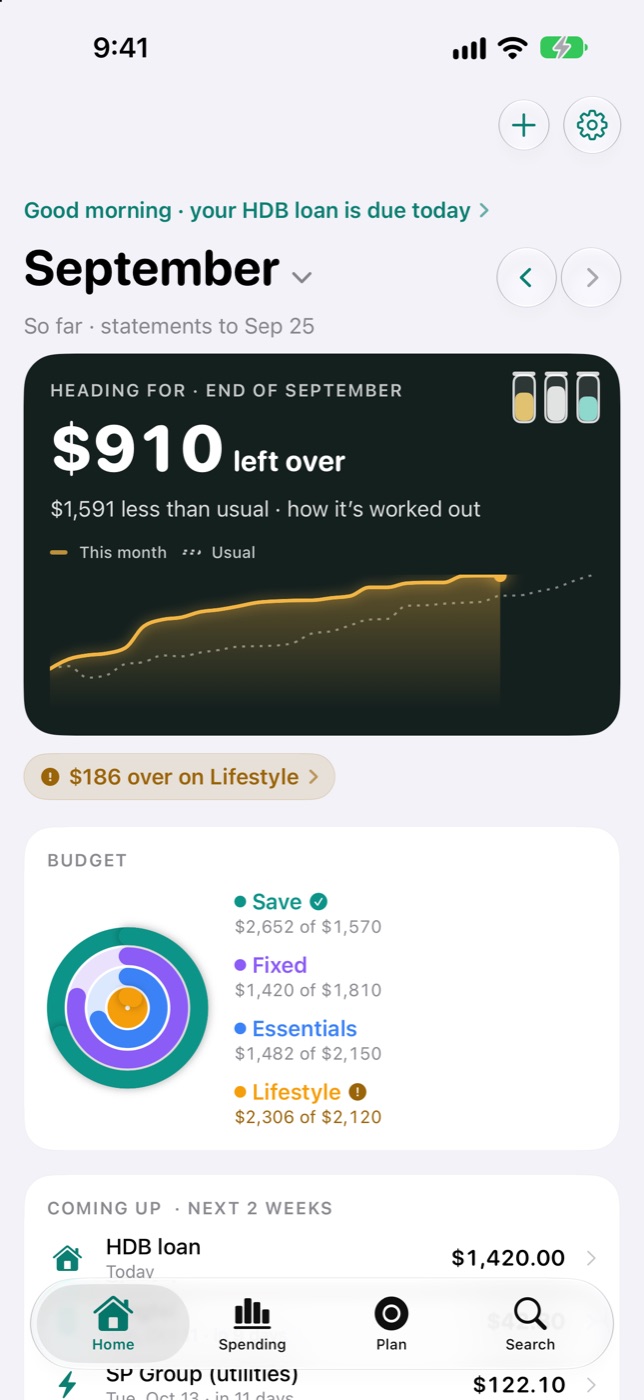
Where the month is heading
Home opens on one number: what this month should leave you with. The line under it is your spending day by day, and the dotted line is a usual month. When the line turns amber, you're spending faster than usual. Hold and drag to read any day.
Keep
Years of typing, put to work
Kept your spending in Excel? Add the workbook and Tallied reads every sheet on your iPhone, keeping your categories. From the first day you see a whole year side by side, what's usual and what changed. Your statements carry it on from there, and nothing is counted twice.
The whole tour, in under three minutes
Walk through Tallied
Shown with invented sample data. Narration is a synthetic voice.
Everywhere you check
On your wrist, your Lock Screen and your iPad
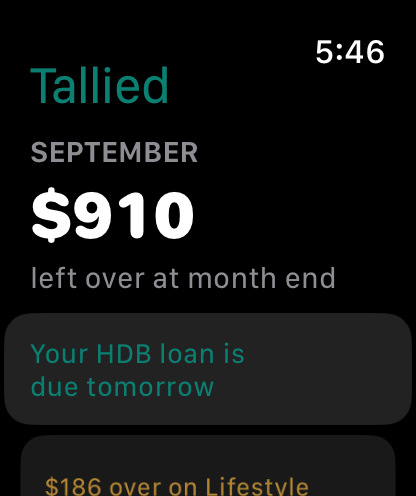
On your wrist
The Apple Watch app shows where the month is heading and what's due, and you can add a cash spend from your wrist.
On your Home and Lock Screen
Widgets keep the month in view without opening the app. When a statement is likely out, a Live Activity on the Lock Screen reminds you to add it.
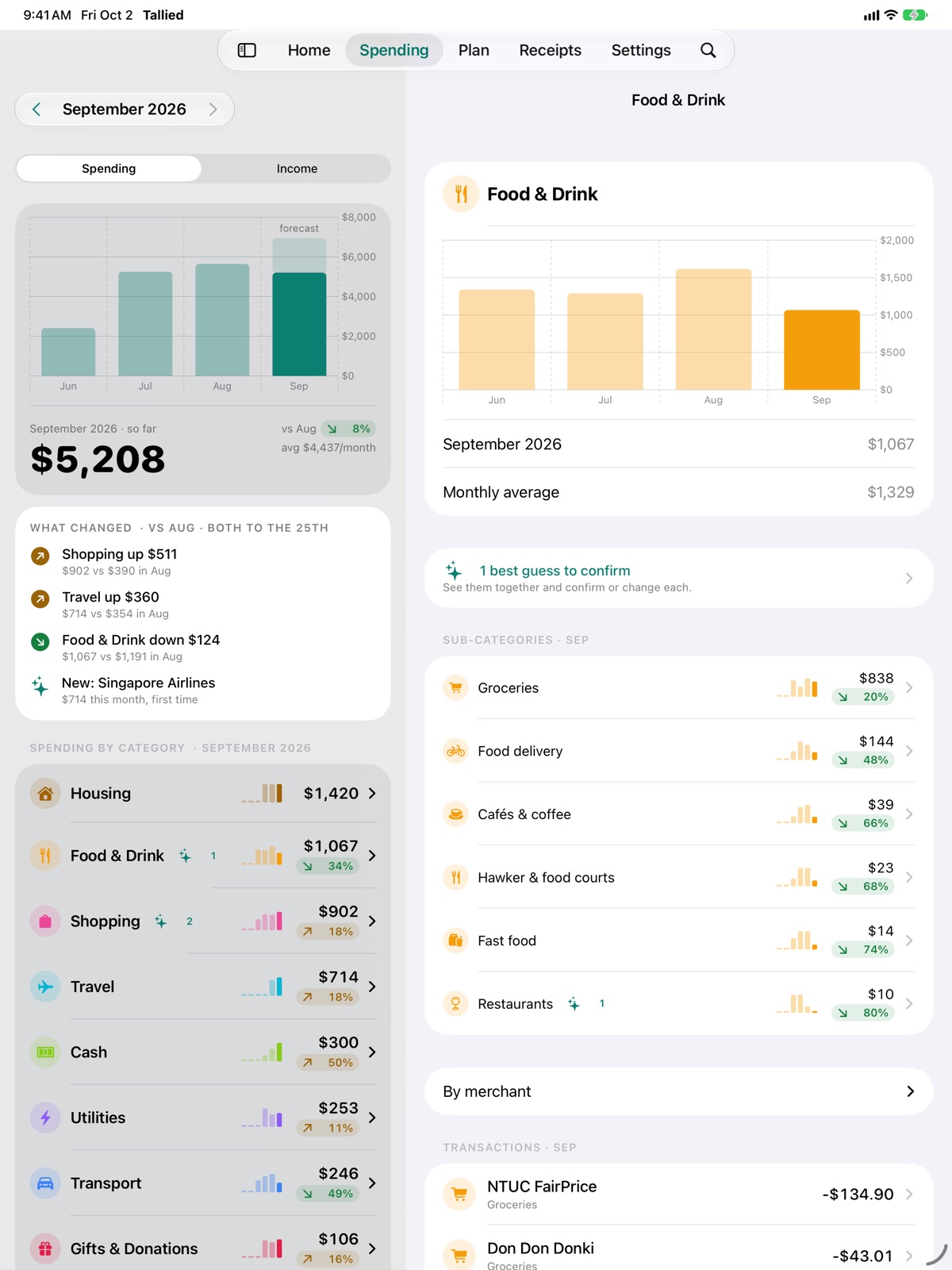
On your iPad
The same app on a bigger screen, with the list on the left and the detail beside it.
Private by design
Your statements stay on your phone.
- Your statements, transactions and receipts stay on your iPhone. They're never uploaded, to us or to anyone else.
- There's no account to create and no bank login to hand over.
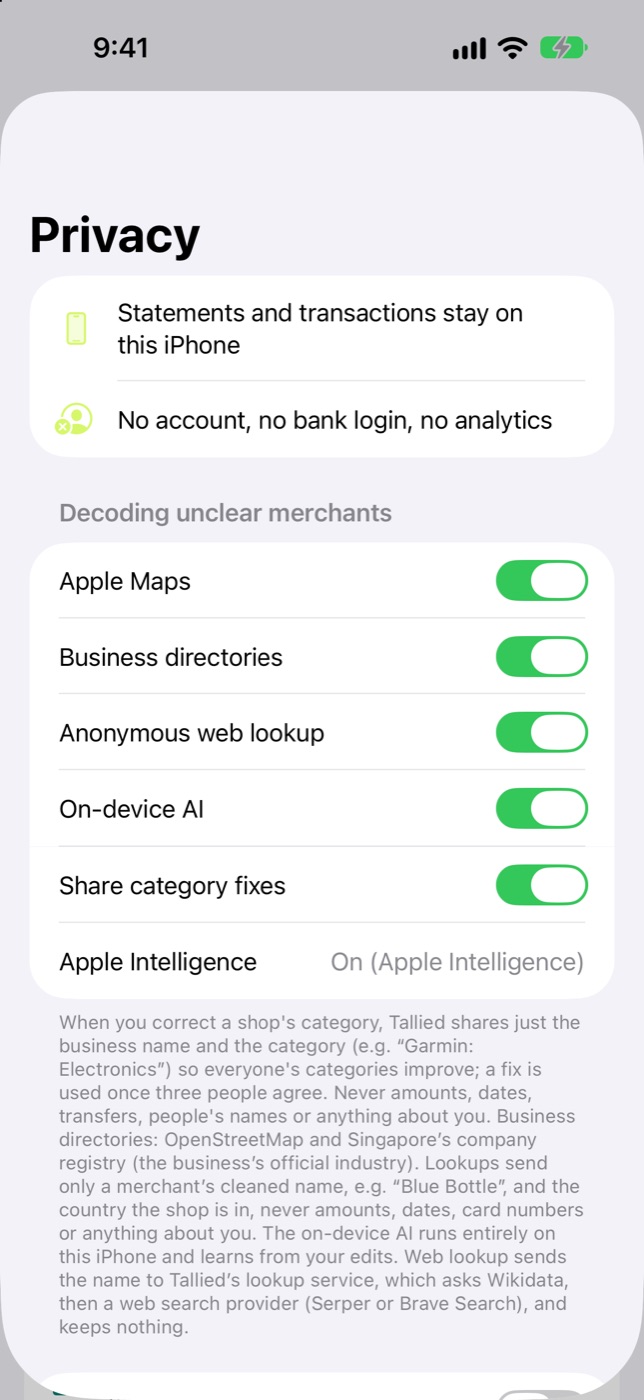
- To recognise an unfamiliar shop, Tallied looks up only its cleaned name and the country it's in, never an amount, a date, a card number or anything about you. If you correct a shop's category, it can share just that shop's name and the category. You can switch both off.
- No ads, no analytics and no tracking. You can lock the app with Face ID.
Pricing
Try it free for a week
S$6.99
a month, after 7 days free
Cancel any time.
S$59.99
a year, after 7 days free
About S$5 a month.
Guides
Your statements, explained
- Tallied guideHow to see your spending from your bank e-statements in Singapore
- Tallied guideHow to download your DBS, OCBC and UOB e-statements
- Tallied guideHow to find every subscription on your bank statement
- Tallied guideSeedly's expense tracker has closed: how to rebuild your spending history
- Decode your statementWhat is GIRO SP DIGITAL on my bank statement?
- Decode your statementWhat is NETS QR on my bank statement?
Questions
What people ask
›Which banks can it read?
Tallied reads PDF e-statements from Singapore banks and cards, credit cards and savings accounts alike. It's been checked most on DBS/POSB; if a statement from your bank doesn't come in, Settings › Statements folder › Check every statement says why.
›I already track my spending in Excel. Can I keep it?
Yes. Add the workbook (Excel or CSV) and Tallied reads every sheet on your iPhone and keeps your categories, so years of careful typing turn into what changed and where the month really goes. Your statements carry it on from there, and nothing is counted twice. Cash you noted down stays.
›Do I need to give it my bank login?
No. Tallied never connects to your bank. You save the statements you already receive, and it reads them on your phone.
›What leaves my phone?
Your statements, transactions and receipts don't. When Tallied meets a shop it doesn't know, it can look up the shop's name and the country it's in to place it in a category. If you correct a shop's category, it can share that shop's name and the category you chose so everyone's categories improve, never anything about you. Both can be switched off in Settings › Privacy.
›What if a statement doesn't come in?
Settings › Statements folder › Check every statement lists every file in your folder and what happened to it. If one couldn't be read, it says why and gives you a button to read it again.
›What does it cost?
7 days free, then S$6.99 a month or S$59.99 a year. You can cancel any time in your App Store settings.
›Where is it available?
On the App Store in Singapore. For iPhone and iPad (iOS 26 or later), with an Apple Watch app that works alongside your iPhone. Tallied is made in Singapore by Zephy Studio, a one-man band.
No bank login. Just clarity.
Tallied is on the App Store in Singapore. Try it free for 7 days.
Download on the App StoreWant the next version early? Join the beta on TestFlight.